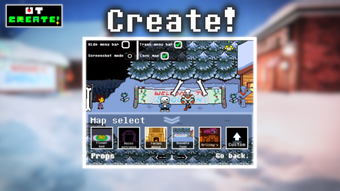

Download UT Create – Undertale fan game, Undertale modding, Undertale animation, Undertale scene creator, Undertale dialog creator, stop-motion animation, custom dialogues, character customization, story creation, alternate universe
Overview
UT Create is a desktop application designed for fans of the popular indie RPG Undertale, offering a comprehensive suite of tools to craft original content within the game’s universe. The software enables users to animate characters, design custom scenes, write interactive dialogues, and build alternate storylines across various maps and environments. It is tailored for creative individuals who wish to expand upon the Undertale narrative through fan-made projects, including mods, animated shorts, and interactive stories.
The app supports the creation of stop-motion animations via its Movie Maker feature, allowing users to sequence character movements and transitions with precision. The Scene Creator facilitates the arrangement of characters, objects, and backgrounds into dynamic, story-driven setups. Additionally, the Dialog Creation module empowers users to script and style animated conversations with customizable voices, speeds, fonts, and colors.
While the developer is identified as the UT Create Team, no further organizational details were provided. The software is intended for hobbyists, fan artists, and narrative designers seeking to explore their creativity within a familiar and beloved game world.
Key Features & Capabilities
- Movie Maker – A stop-motion animation tool that enables users to sequence character frames and movements to create animated scenes. Ideal for producing short fan films or interactive cutscenes.
- Scene Creator – Allows users to place characters, objects, and backgrounds on customizable maps to build unique environments and story setups. Supports various locations from the Undertale universe.
- Dialog Creation – Offers tools to script, style, and animate dialogue sequences. Users can select character voices, adjust text speed, choose fonts and colors, and apply visual effects to enhance storytelling.
- Character Customization – Provides options to modify character appearances, expressions, and animations to fit alternate universe narratives or original designs.
- Story Creation Engine – Supports branching narratives and scene transitions, enabling users to build complex, interactive stories with multiple outcomes.
These features collectively empower users to design immersive experiences that reflect their vision of the Undertale world. For example, a user could create a fan-made episode where Asriel returns in a new form, complete with custom dialogue, animated reactions, and a cinematic sequence using the Movie Maker. The Scene Creator allows for detailed environment setup, such as reimagining Snowdin Town with new structures and character interactions. The Dialog Creation tool ensures that every exchange feels authentic to the original game’s tone, with options to match character personalities through voice and text styling.
User Interface, Workflow & Performance
UT Create features a desktop interface designed for intuitive navigation, with a layout centered around modular panels for animation, scene design, and dialogue editing. Users can switch between tools seamlessly, with a consistent visual language across all modules. The workflow is structured to guide users through content creation in a logical sequence: scene setup, character placement, dialogue scripting, and animation sequencing.
While the developer did not specify resource usage details, the application’s 100 MB size suggests a lightweight footprint, which may indicate efficient performance on standard systems. The software does not report any known stability issues, and general behavior aligns with typical desktop applications in the creative tools category. Performance observations are based on general software behavior patterns, as no benchmark data was provided.
The application appears optimized for smooth operation during content creation, though exact CPU and RAM usage were not disclosed.
Compatibility & System Requirements
UT Create is available for both Windows and Mac operating systems, supporting the latest versions of each platform as of its release date. The software has a file size of 100 MB, indicating a compact installation package. The developer did not specify additional system requirements, such as minimum RAM, processor speed, or graphics capabilities.
Compatibility information was partially provided, with no mention of older OS versions or hardware limitations. The developer did not provide details on whether the software requires an internet connection for activation or updates. Users should ensure their system meets general desktop application requirements to run the software smoothly.
Pros and Cons
Pros
- Comprehensive toolset tailored for Undertale fan content creation
- Integrated Movie Maker for stop-motion animation
- Flexible scene and dialogue customization options
- Designed with a clear workflow for narrative and visual storytelling
- Compact 100 MB installation size
Cons
- No detailed system requirements provided
- Price point of $49.99 may be high for casual users
- Limited information on update frequency or support
- Compatibility with older operating systems not confirmed
- No public user community or tutorial resources mentioned
FAQ Section
Is UT Create compatible with older versions of Windows and Mac?
Compatibility with older operating systems was not specified by the developer. The software is known to support current versions of Windows and Mac, but no information was provided regarding legacy OS support.
Is the software safe to download and install?
UT Create is distributed as a standalone desktop application. As with any software, users should download from official sources to ensure security. No malware or privacy concerns were reported in the provided information.
Does UT Create require an internet connection to function?
The developer did not specify whether an internet connection is required for operation. The software may function offline, but activation or updates might require connectivity.
What type of license does UT Create use?
The license type was not disclosed. Users should refer to the official website or end-user agreement for details on usage rights and redistribution policies.
Can I use UT Create to make content for public sharing?
Yes, the software is designed for creating fan content, including mods, animations, and stories. Users are free to share their creations, though they should respect the original game’s intellectual property and community guidelines.
Final Thoughts + CTA
UT Create delivers a powerful and focused experience for Undertale enthusiasts looking to expand the game’s universe through original storytelling and animation. Its suite of tools—ranging from scene building to dialogue scripting and stop-motion creation—provides a robust foundation for fan-made projects. While the lack of detailed system requirements and limited public support resources may be drawbacks for some, the software’s compact size, clear interface, and creative potential make it a compelling choice for dedicated fans.
The $49.99 price tag reflects its specialized nature and advanced features, positioning it as a premium tool for narrative designers and animators within the Undertale community. For those invested in the game’s lore and eager to craft their own alternate universes, UT Create offers a professional-grade platform to bring their visions to life. Download UT Create now.







